Automate your WooCommerce returns management.
ManageRefund centralises return requests, automates customer communications and keeps everything under control inside WooCommerce. No emails, no spreadsheets, no lost requests. Compliant with EU Directive 2023/2673.
It's not just a return request form. It's a complete system to manage every request directly inside WooCommerce.
How do you handle returns today?
Many e-commerce stores still manage returns via email and spreadsheets. There's a better way.
Without ManageRefund
- Scattered untracked emails
- WhatsApp and phone calls
- Lost or forgotten requests
- Manually updated spreadsheets
- No legal receipt
- Risk of non-compliance
With ManageRefund
- Everything inside WooCommerce
- Case linked to the order
- Customer updated automatically
- Complete searchable history
- Automatic legal receipt
- Compliant with EU Directive 2023/2673
How it works in 4 steps
From the customer's click to the closed case — fully automatic.
Who is ManageRefund for
Small e-commerce stores
Manage returns in an orderly way without losing time in emails and spreadsheets. Everything in one place, inside WooCommerce.
High-volume shops
Centralise all requests, avoid errors and track every case without stress.
WooCommerce agencies
Offer your clients professional returns management, ready to integrate into any project.
WooCommerce Withdrawal Plugin — Mandatory Button Art. 54-bis
Adds the mandatory withdrawal button to the order area. Double confirmation, tamper-proof log, WPML and Multisite included.
Everything you can do
Features already available — not future promises.
Our plans
Choose the right plan. One-time payment, discounted renewal.
The plugin works without renewal. Renewal is only for updates and support.
Satisfied or refunded
You have 30 days to try ManageRefund. If you are not completely satisfied, we will refund the full amount.
Why choose ManageRefund
- Built exclusively for WooCommerce
- Developed in Italy, by people who manage e-commerce every day
- Compliant with EU Directive 2023/2673
- 1 year of updates included in the price
- Direct support included
- Installation and configuration available with AF Project
About us
We build and manage WooCommerce e-commerce stores every day. ManageRefund was born from real experience with real clients and from concrete needs in returns management. AF Project di Benzi Filippo is a software agency based in Carpi, Italy, developing WordPress plugins, custom management software and e-commerce solutions since 2015.
No developer on hand?
AF Project can install, configure, customise and support you directly.
Digital withdrawal vs WooCommerce returns: what is the difference?
Two concepts that are often confused, but governed by different rules. ManageRefund handles both.
Already in use
La disponibilità dello sviluppatore è impeccabile, con risultati di ottimo livello.

Frequently asked questions
Everything about digital withdrawal
What happens if a customer wants to withdraw but I don't have the button?
Without the digital withdrawal mechanism required by EU regulations, the period during which the consumer can withdraw automatically extends from 14 days to 12 months. Additionally, the seller faces administrative sanctions, challenges from consumer associations, and late refund claims. The withdrawal button is not optional — it is a legal requirement.
Does the plugin work with my version of WooCommerce?
Yes. ManageRefund is compatible with WooCommerce 9+ and WordPress 6.7+. It supports HPOS (High-Performance Order Storage) and has been tested with major WordPress themes including Astra, Flatsome, Blocksy, Storefront, and OceanWP. It also supports WPML for multilingual sites.
Can I use ManageRefund on multiple sites?
Yes. The Single Site plan covers one license. The Up to 5 Sites plan (€129) includes 5 licenses and subscription management. The Agency plan (€249) offers unlimited sites, white label, and priority support. All plans are one-time payment with 1 year of updates included.
Do I need to pay an annual subscription for ManageRefund?
No. The payment is one-time. The plugin continues to work even without renewal. The annual renewal (40% discount from launch price) is only for receiving regulatory updates and technical support. If the law changes, the plugin is updated.
How does withdrawal work for digital products and video courses?
For digital content (video courses, e-books, software), the right of withdrawal can only be excluded if the consumer has given explicit consent before download or access. ManageRefund handles both cases: you can configure exclusions by product category, and the withdrawal button will only appear when necessary.
Does ManageRefund send automatic emails to customers?
Yes. After the double confirmation of withdrawal, the system automatically sends a legal receipt with exact date and time to the consumer. When the seller approves the withdrawal from the WooCommerce backend, the customer receives another acceptance notification. Everything is tracked and archived in order metadata.
Can unregistered users exercise the right of withdrawal?
Yes. Article 54-bis of the Consumer Code does not distinguish between registered and unregistered users. The withdrawal button must be accessible for every contract concluded online, including guest purchases. ManageRefund works for both logged-in users and guests: the customer enters their email and order number, and the system guides them through the double-confirmation withdrawal flow.
How do I add the withdrawal form to my site?
No code required — pick whichever method suits you best.
Shortcode: add [recesso_dlgs209] to any page (Gutenberg or classic editor) and the full form will appear automatically.
Elementor: drag the "Form Recesso DLgs 209" widget (category "Recesso DLgs 209") from the widgets panel.
Divi Builder: add the "Form Recesso DLgs 209" module to the desired row, among the available modules.
In every case the form works immediately and its style can be customized right from the editor.
When does the withdrawal form appear on the customer's order page?
The form appears only after the order has been marked "Delivered" with a delivery date recorded, and stays visible until the withdrawal period expires (delivery date + configured days).
Once the deadline has passed, the form disappears automatically and the customer sees a message with the expiry date instead. The same happens if all products in the order have already been withdrawn or are excluded.
How much time do I have to comply with the withdrawal button obligation?
The obligation applies to contracts concluded from 19 June 2026 onwards. EU Directive 2023/2673 has been transposed into national laws across all member states. A 6-month transitional period was granted to allow all e-commerce stores to adapt. ManageRefund installs in 2 minutes — you are instantly compliant.
How ManageRefund works
See how easy returns management can be
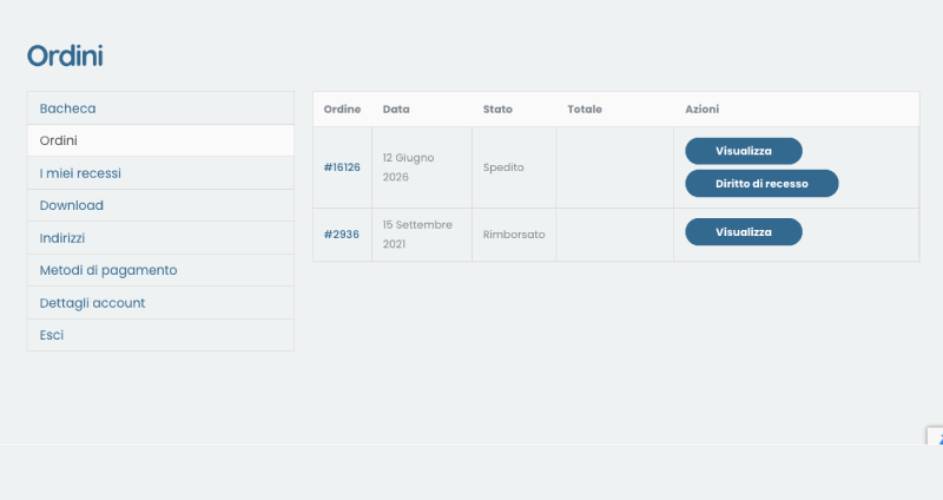
1. Withdrawal button
Customer clicks "Withdraw from contract"
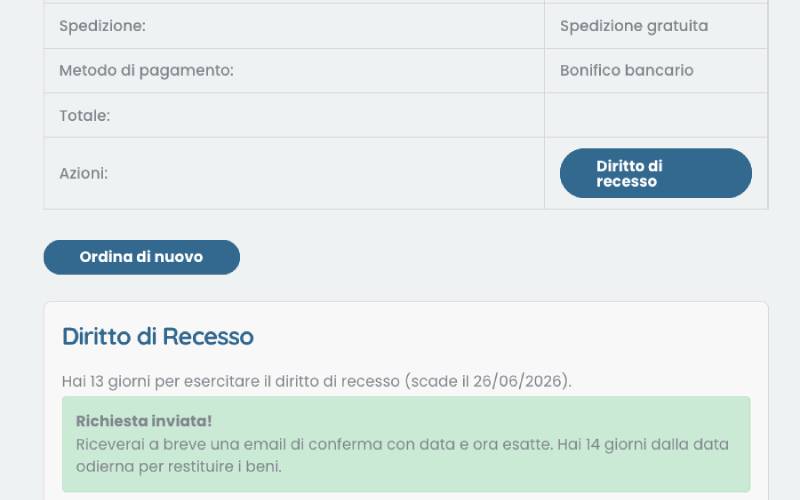
2. Double confirmation
Confirm the withdrawal intent
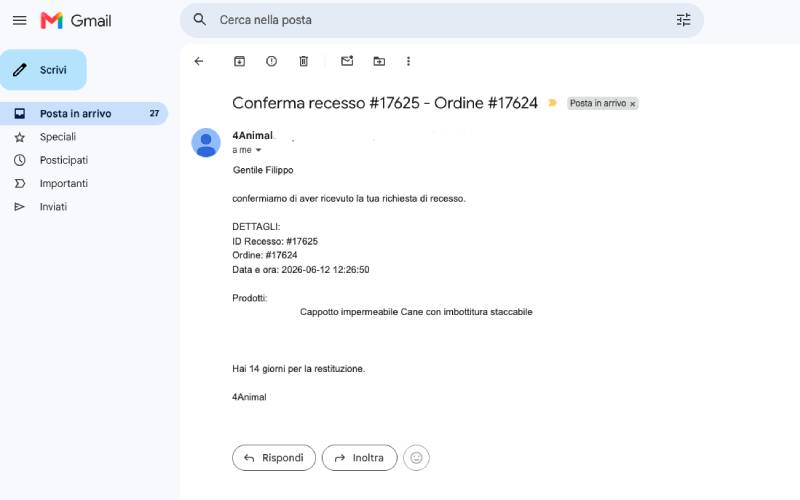
3. Legal receipt
Automatic email with date and time
Even unregistered users can withdraw.The law makes no distinction: the button works for all contracts concluded online.
Try it on your WooCommerce
No emails, no spreadsheets. Everything inside WooCommerce, legally compliant.
Contact us
Questions? We are here to help.